Un nouvel object connecté a trouvé sa place dans la maison, il s’agit d’un écran qui affiche des informations en permanence et qui est mis à jour toutes les minutes.
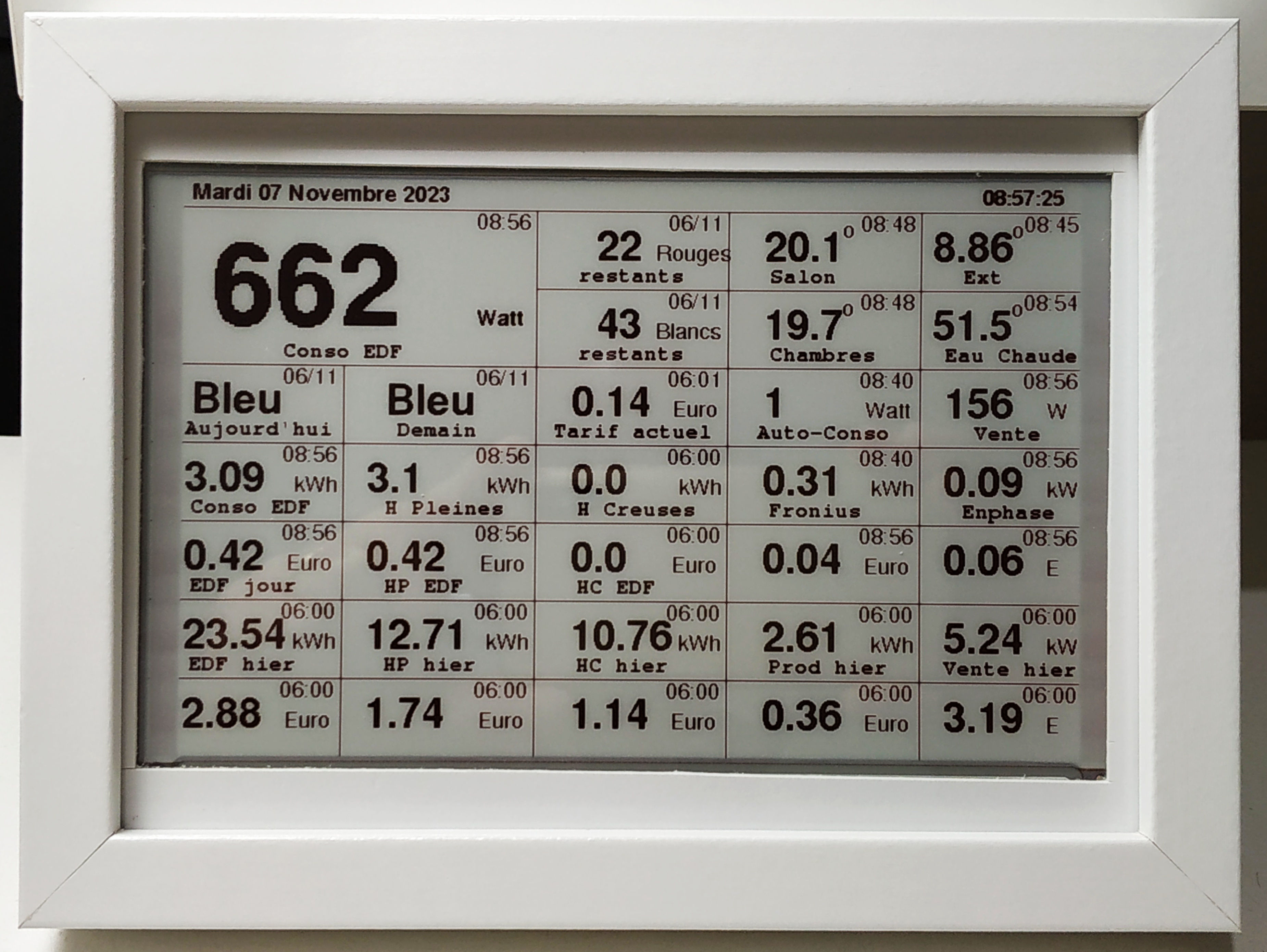
C’est du « fait-maison », j’ai utilisé un écran e-paper Noir/Blanc/Rouge de 7.5′ (résolution 800×480) + un ESP32 qui pilote et alimente l’écran. Il faut rajouter une alimentation en 5V (un chargeur de téléphone par exemple) et un cadre photo 13×18 pour héberger l’ensemble (et aussi un bout de depron et un peu de patafix ! 😉 ).
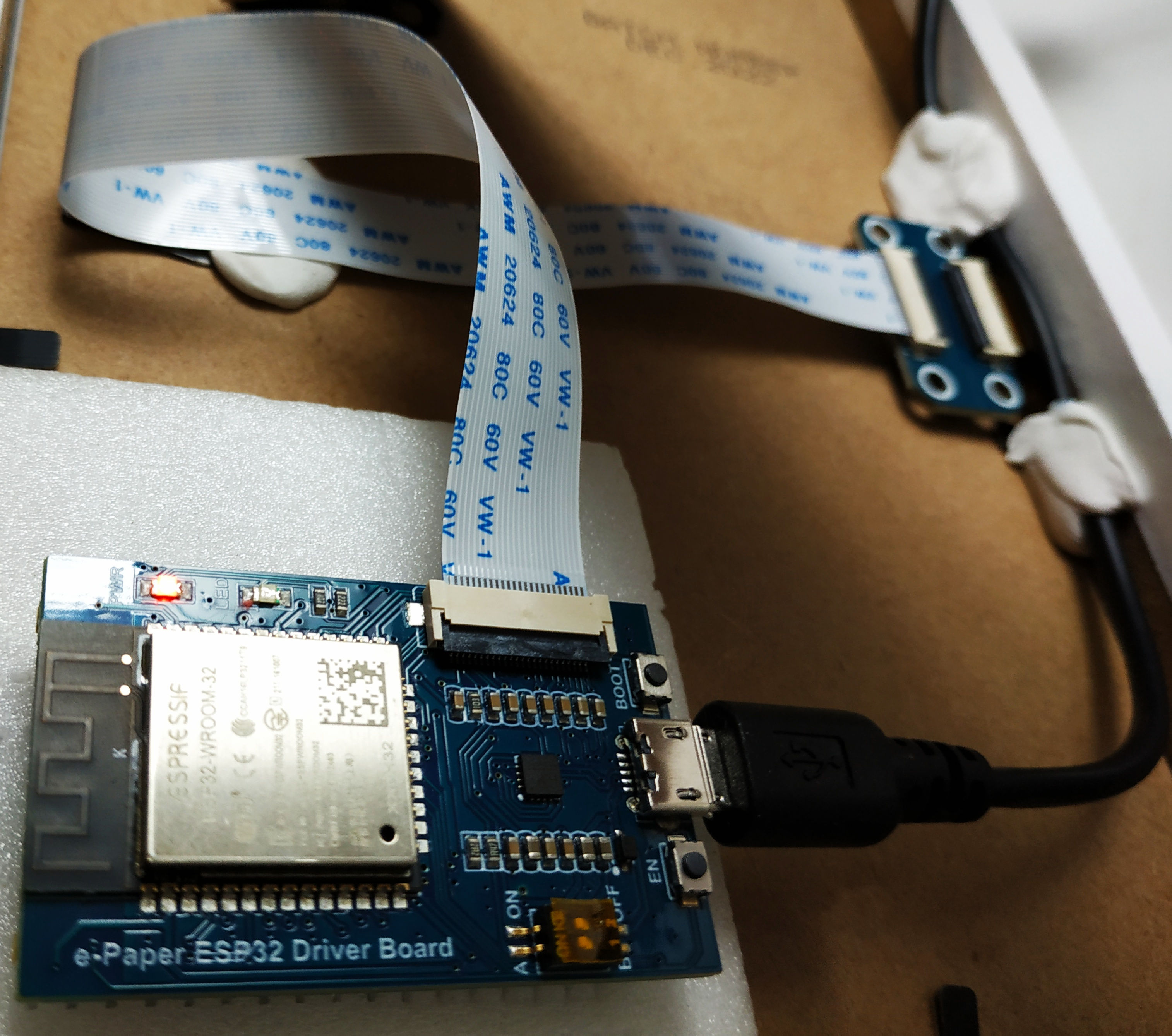
C’est un ESP32 classique mais sur une carte spécifique e-paper pour simplifier la connectique. J’ai fait des essais avec une breadboard et des câbles dupont mais ce n’était pas satisfaisant (trop complexe pour trouver les « pin » ad hoc côté l’ESP32 et côté écran 🙄 ).
Pourquoi cet écran connecté ? Pour ne plus avoir à répondre aux questions suivantes 😉 (version plus consensuelle pour « pour apporter une réponse objective et immédiate aux questions variées liées à l’utilisation domestique de l’énergie électrique ») :
- Quelle est la température dehors ? (ou dans les chambres, …)
- Je peux lancer une machine ?
- Quelle est la couleur Tempo demain ?
- Il reste combien de jours rouges ?
- On a produit combien aujourd’hui ? (ou hier !)
- On a consommé beaucoup en heures pleines ? (ou en heures creuses)
- Ça représente combien d’€uros ?
- Quel est le tarif Tempo actuel ?
- …
On voit bien à travers ces questions que cet objet connecté devenait indispensable 😆 !
Il y a plusieurs zones d’information sur cet écran qui permettent de répondre aux multiples questions liées à l’utilisation de l’électricité dans la maison.
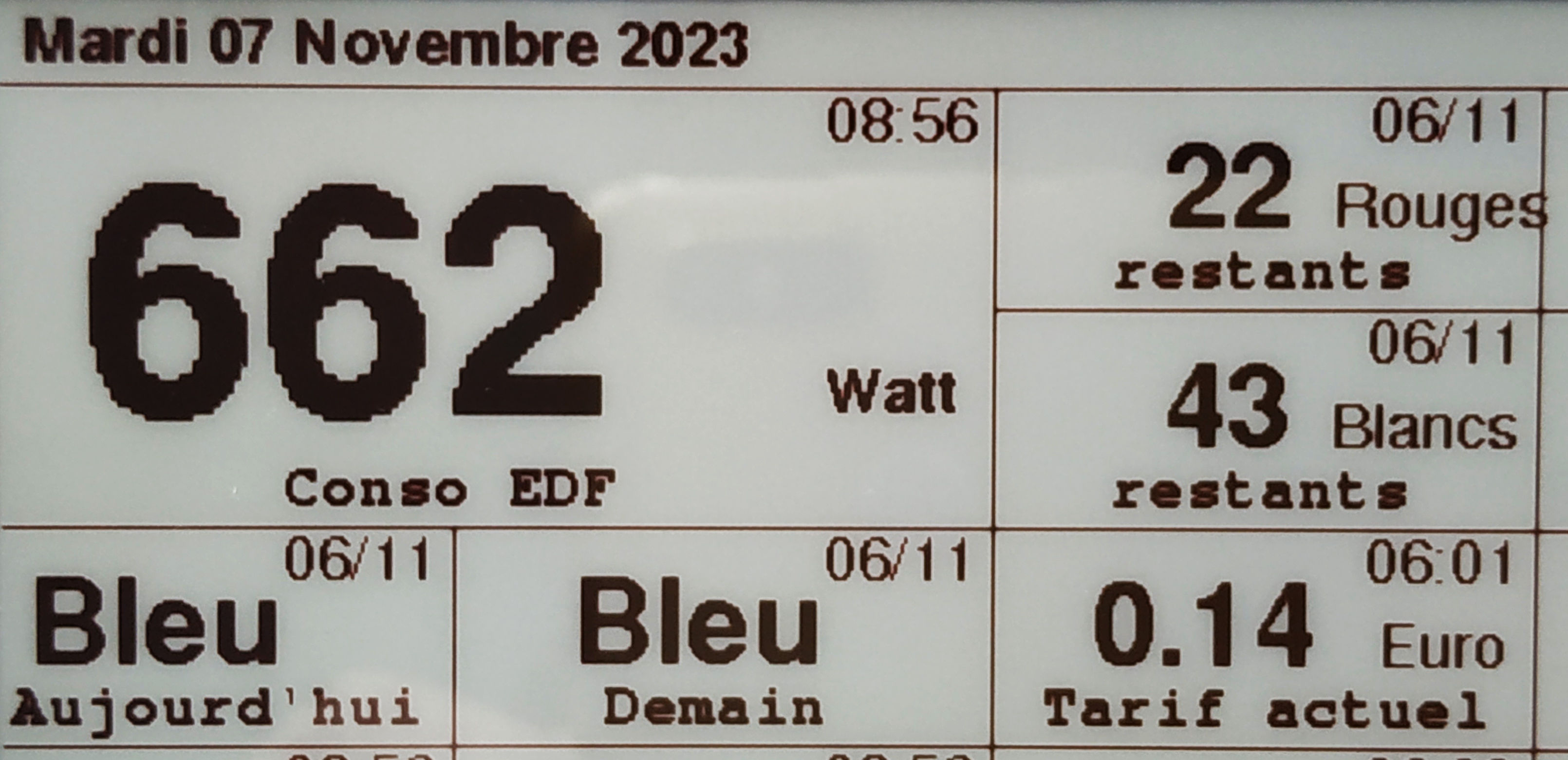
Dans cette partie gauche de l’écran, on voit l’information la plus importante (en plus gros caractères) : la consommation EDF instantanée qui permet la prise de décision pour lancer une machine (surtout si l’affichage est à zéro !). Il y a aussi les informations Tempo :
- Couleur du jour et du lendemain
- Tarif en cours (arrondi à 2 décimales)
- Nombre de jours Rouges et Blancs restants
Sur la première ligne de l’écran, il y a la date du jour à gauche et l’heure à droite (c’est l’heure de la dernière mise à jour de l’écran). Dans chaque case, il y a en haut à droite l’heure de la dernière mise à jour de la valeur; si la mise à jour n’a pas été faite dans la journée, c’est la date de mise à jour (en format jj/mm) qui est affichée.
Les informations Tempo sont mises à jour entre 12h00 et 12h15 chaque jour, c’est donc la date de la veille qui figure sur l’écran. Le tarif en cours change à 6h00 et à 22h00.
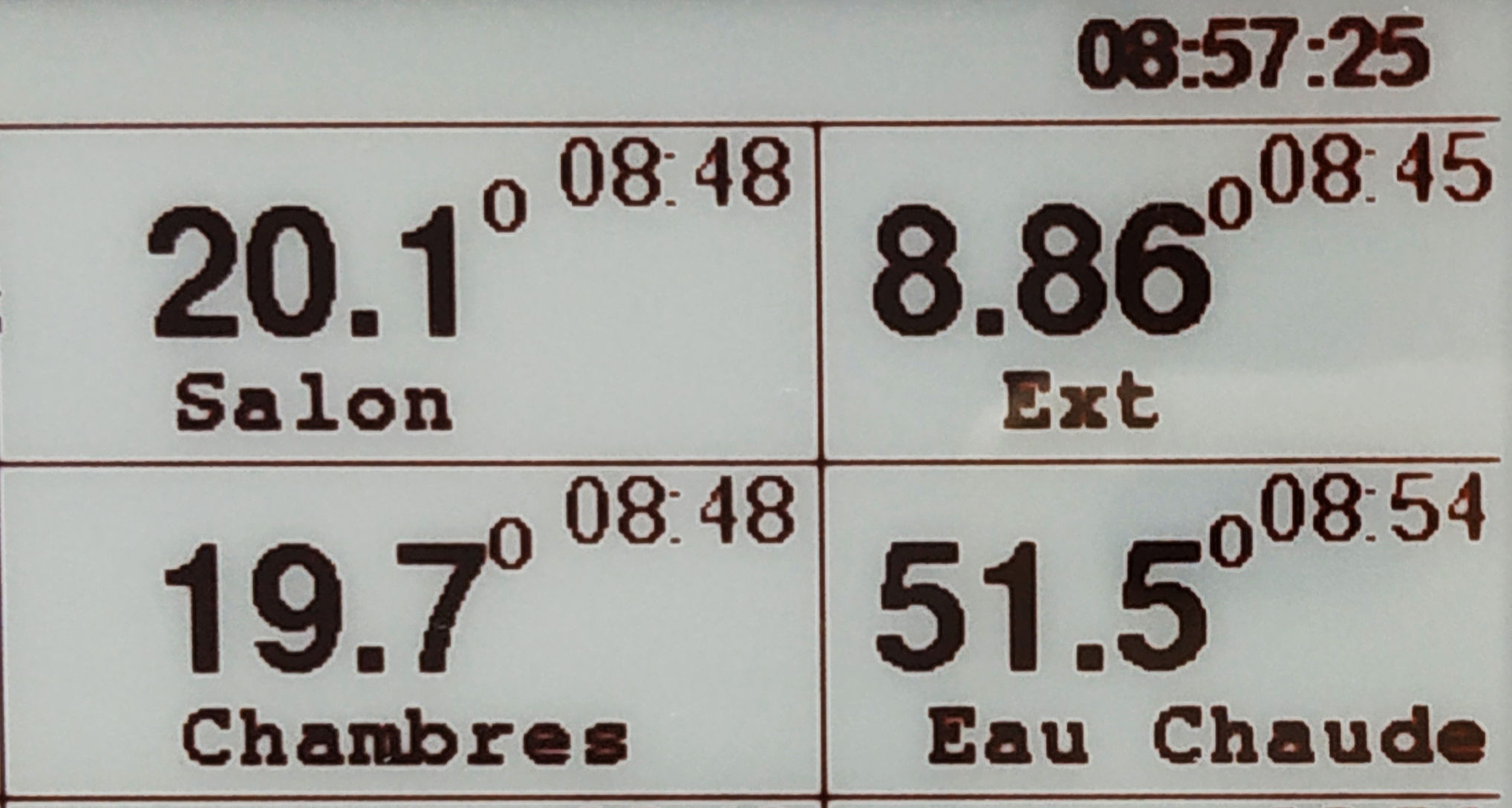
Sur la droite en haut de l’écran, il y a les températures (extérieur, chambres et salon) et la température du circuit d’eau chaude sanitaire pour permettre une décision éventuelle de relance de la production d’eau chaude.

Dans ces 2 lignes, c’est la situation en temps réel avec la consommation EDF en kWh (totale, heures pleines et heures creuses), la production pour l’auto-consommation et la production pour la vente à EDF(en kWh et en € sur la ligne en dessous).

Cette zone est présente pour permettre des comparaisons. Sur la première ligne, on voit la consommation EDF en kWh (totale, heures pleines et heures creuses), la production pour l’auto-consommation et la production pour la vente à EDF. Sur la dernière ligne, c’est identique mais en €uros.
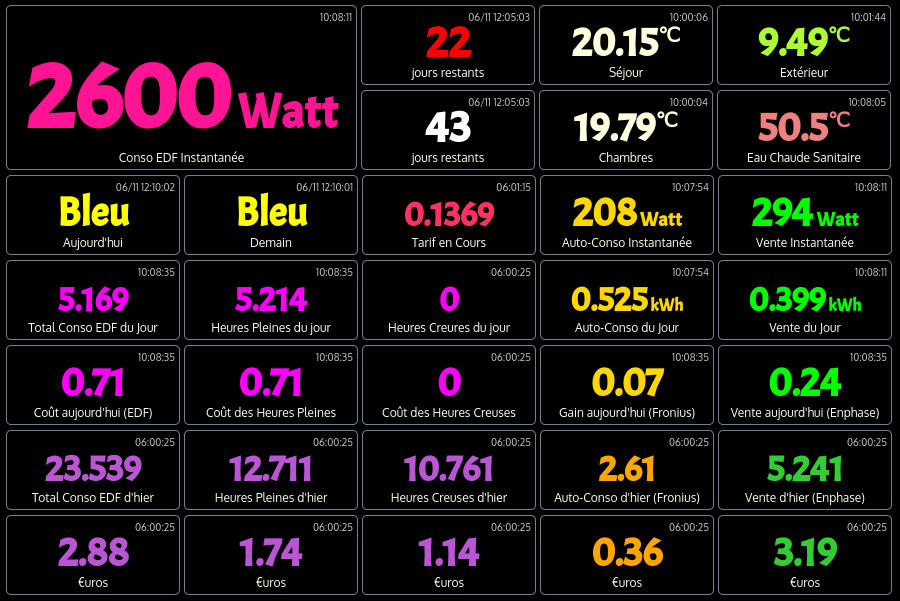
Pour préparer cet objet connecté, j’ai d’abord réalisé une version monitor de ce que je souhaitais afin de m’assurer que toutes les informations étaient bien disponibles dans Domoticz. J’utilise les 2 versions en // car la version monitor est utilisable sur tablette, smartphone et à distance.
Le programme pour l’ESP32 est un peu long car il y a beaucoup d’instructions d’affichage, il intégre la gestion du protocole mqtt et l’Over The Air pour permettre les mise à jour à distance en wifi.
|
1 2 3 4 5 6 7 8 9 10 11 12 13 14 15 16 17 18 19 20 21 22 23 24 25 26 27 28 29 30 31 32 33 34 35 36 37 38 39 40 41 42 43 44 45 46 47 48 49 50 51 52 53 54 55 56 57 58 59 60 61 62 63 64 65 66 67 68 69 70 71 72 73 74 75 76 77 78 79 80 81 82 83 84 85 86 87 88 89 90 91 92 93 94 95 96 97 98 99 100 101 102 103 104 105 106 107 108 109 110 111 112 113 114 115 116 117 118 119 120 121 122 123 124 125 126 127 128 129 130 131 132 133 134 135 136 137 138 139 140 141 142 143 144 145 146 147 148 149 150 151 152 153 154 155 156 157 158 159 160 161 162 163 164 165 166 167 168 169 170 171 172 173 174 175 176 177 178 179 180 181 182 183 184 185 186 187 188 189 190 191 192 193 194 195 196 197 198 199 200 201 202 203 204 205 206 207 208 209 210 211 212 213 214 215 216 217 218 219 220 221 222 223 224 225 226 227 228 229 230 231 232 233 234 235 236 237 238 239 240 241 242 243 244 245 246 247 248 249 250 251 252 253 254 255 256 257 258 259 260 261 262 263 264 265 266 267 268 269 270 271 272 273 274 275 276 277 278 279 280 281 282 283 284 285 286 287 288 289 290 291 292 293 294 295 296 297 298 299 300 301 302 303 304 305 306 307 308 309 310 311 312 313 314 315 316 317 318 319 320 321 322 323 324 325 326 327 328 329 330 331 332 333 334 335 336 337 338 339 340 341 342 343 344 345 346 347 348 349 350 351 352 353 354 355 356 357 358 359 360 361 362 363 364 365 366 367 368 369 370 371 372 373 374 375 376 377 378 379 380 381 382 383 384 385 386 387 388 389 390 391 392 393 394 395 396 397 398 399 400 401 402 403 404 405 406 407 408 409 410 411 412 413 414 415 416 417 418 419 420 421 422 423 424 425 426 427 428 429 430 431 432 433 434 435 436 437 438 439 440 441 442 443 444 445 446 447 448 449 450 451 452 453 454 455 456 457 458 459 460 461 462 463 464 465 466 467 468 469 470 471 472 473 474 475 476 477 478 479 480 481 482 483 484 485 486 487 488 489 490 491 492 493 494 495 496 497 498 499 500 501 502 503 504 505 506 507 508 509 510 511 512 513 514 515 516 517 518 519 520 521 522 523 524 525 526 527 528 529 530 531 532 533 534 535 536 537 538 539 540 541 542 543 544 545 546 547 548 549 550 551 552 553 554 555 556 557 558 559 560 561 562 563 564 565 566 567 568 569 570 571 572 573 574 575 576 577 578 579 580 581 582 583 584 585 586 587 588 589 590 591 592 593 594 595 596 597 598 599 600 601 602 603 604 605 606 607 608 609 610 611 612 613 614 615 616 617 618 619 620 621 622 623 624 625 626 627 628 629 630 631 632 633 634 635 636 637 638 639 640 641 642 643 644 645 646 647 648 649 650 651 652 653 654 655 656 657 658 659 660 661 662 663 664 665 666 667 668 669 670 671 672 673 674 675 676 677 678 679 680 681 682 683 684 685 686 687 688 689 690 691 692 693 694 695 696 697 698 699 700 701 702 703 704 705 706 707 708 709 710 711 712 713 714 715 716 717 718 719 720 721 722 723 724 725 726 727 728 729 730 731 732 733 734 735 736 737 738 739 740 741 742 743 744 745 746 747 748 749 750 751 752 753 754 755 756 757 758 759 760 761 762 763 764 765 766 767 768 769 770 771 772 773 774 775 776 777 778 779 780 781 782 783 784 785 786 787 788 789 790 791 792 793 794 795 796 797 798 799 800 801 802 803 804 805 806 807 |
// Programme qui permet l'affichage des informations liées à la consommation électrique sur un écran e-paper // sur la base d'exemples de Jean-Marc Zingg (pour la gestion de l'écran) et Cyril Poissonnier (pour Domoticz via JSON) // et avec modification du transfert depuis Domoticz en utilisant mqtt // écran e-paper 800x480 3 couleurs (noir/blanc/rouge) de Waveshare + ESP32 Driver Board // // Display Library example for SPI e-paper panels from Dalian Good Display and boards from Waveshare. // Requires HW SPI and Adafruit_GFX. Caution: the e-paper panels require 3.3V supply AND data lines! // // Author: Jean-Marc Zingg // // Library: https://github.com/ZinggJM/GxEPD2 // Supporting Arduino Forum Topics: // Waveshare e-paper displays with SPI: http://forum.arduino.cc/index.php?topic=487007.0 // NOTE for use with Waveshare ESP32 Driver Board: // **** also need to select the constructor with the parameters for this board in GxEPD2_display_selection_new_style.h **** // // The Wavehare ESP32 Driver Board uses uncommon SPI pins for the FPC connector. It uses HSPI pins, but SCK and MOSI are swapped. // To use HW SPI with the ESP32 Driver Board, HW SPI pins need be re-mapped in any case. Can be done using either HSPI or VSPI. // Other SPI clients can either be connected to the same SPI bus as the e-paper, or to the other HW SPI bus, or through SW SPI. // The logical configuration would be to use the e-paper connection on HSPI with re-mapped pins, and use VSPI for other SPI clients. // VSPI with standard VSPI pins is used by the global SPI instance of the Arduino IDE ESP32 package. // Bibliothèques #include <WiFi.h> #include <WiFiClient.h> #include <ArduinoOTA.h> // Librairie pour permettre les mises à jour en wifi (Over The Air) #include <PubSubClient.h> // Librairie pour la gestion du protocole mqtt #include <time.h> #include <ArduinoJson.h> // https://github.com/bblanchon/ArduinoJson #include <SoftTimer.h> // Librairie SoftTimer.h (pour le lancement périodique de taches) //#include "RemoteDebug.h" // Librairie RemoteDebug.h (pour mise au point en wifi) //#include "RemoteDebugger.h" // Librairie RemoteDebugger.h (pour mise au point en wifi) // Initialisation de WiFiClient, PubSubClient et RemoteDebug WiFiClient espClient; PubSubClient MQTTclient(espClient); //RemoteDebug Debug; // uncomment next line to use HSPI for EPD (and e.g VSPI for SD), e.g. with Waveshare ESP32 Driver Board #define USE_HSPI_FOR_EPD // base class GxEPD2_GFX can be used to pass references or pointers to the display instance as parameter, uses ~1.2k more code // enable or disable GxEPD2_GFX base class #define ENABLE_GxEPD2_GFX 0 #include <GxEPD2_3C.h> // Utilisation des polices Adafruit GFX // https://learn.adafruit.com/adafruit-gfx-graphics-library/using-fonts #include <Fonts/FreeMono9pt7b.h> #include <Fonts/FreeMonoBold9pt7b.h> #include <Fonts/FreeMonoBold12pt7b.h> #include <Fonts/FreeSans9pt7b.h> #include <Fonts/FreeSans12pt7b.h> #include <Fonts/FreeSansBold9pt7b.h> #include <Fonts/FreeSansBold12pt7b.h> #include <Fonts/FreeSansBold18pt7b.h> #include <Fonts/FreeSansBold24pt7b.h> // select the display class and display driver class in the following file (new style): #include "GxEPD2_display_selection_new_style.h" #if !defined(__AVR) && !defined(STM32F1xx) // comment out unused bitmaps to reduce code space used #include "bitmaps/Bitmaps800x480.h" // 7.5" b/w // 3-color #include "bitmaps/Bitmaps3c400x300.h" // 4.2" b/w/r #if defined(ESP8266) || defined(ESP32) || defined(ARDUINO_ARCH_RP2040) #include "bitmaps/Bitmaps3c648x480.h" // 5.83" b/w/r #include "bitmaps/Bitmaps3c800x480.h" // 7.5" b/w/r #endif #else // select only one to fit in code space // 3-color #include "bitmaps/Bitmaps3c400x300.h" // 4.2" b/w/r // not enough code space #endif #if defined(ESP32) && defined(USE_HSPI_FOR_EPD) SPIClass hspi(HSPI); #endif // Paramétres WIFI à modifier en fonction des paramètres locaux #define wifi_ssid "votre SSID" #define wifi_password "votre MDP" #define host_name "esp32_epaper" // Paramétres MQTT Broker à modifier en fonction des paramètres locaux const char *mqtt_broker = "192.168.1.XX"; char *topic = "domoticz/epaper"; const char *mqtt_username = ""; const char *mqtt_password = ""; const int mqtt_port = 1883; const int mqtt_keepalive = 120; const int mqtt_sockettimeout = 120; // Variables pour la lecture des messages mqtt sur le topic byte *payload; int length; // Définition de l'adresse IP fixe pour l'ESP32 IPAddress local_IP(192, 168, 1, XXX); // Définition de l'adresse IP fixe pour l'ESP32 IPAddress gateway(192, 168, 1, 1); // Indication de l'adresse de la passerelle (la box) IPAddress subnet(255, 255, 255, 0); // Indication du subnet du réseau local IPAddress primaryDNS(192, 168, 1, 1); // facultatif - Indication du serveur DNS primaire à utiliser (ici DNS de Google) IPAddress secondaryDNS(8, 8, 8, 8); // facultatif - Indication du serveur DNS secondaire à utiliser (ici DNS de Google) // Paramétres pour la synchro NTP const char* ntpServer = "fr.pool.ntp.org"; const long gmtOffset_sec = 3600; const int daylightOffset_sec = 0; // pendant l'heure d'été mettre à 3600 sinon à zéro // Variables pour la connexion à Domoticz en http char* host = "192.168.1.35"; int httpPort = 8080; // Variables pour l'affichage initial // char timeWeekDay[10]; char jjsem[2]; // Jour de la semaine (de 1 à 7) 1 = Lundi char jjmois[3]; // Jour du mois char mois[3]; // Mois (de 1 à 12) char annee[5]; // Année char heure[9]; // Heure String L0Z1; // Jour String L0Z5; // Heure String L0Z8 = "Suivi Tempo Gradignan"; // Variables principales des zones d'affichage (7 lignes et 5 colonnes) // première cellule double (2 lignes sur 2 colonnes) String L1C1; String L1C3; String L1C4; String L1C5; String L2C3; String L2C4; String L2C5; String L3C1; String L3C2; String L3C3; String L3C4; String L3C5; String L4C1; String L4C2; String L4C3; String L4C4; String L4C5; String L5C1; String L5C2; String L5C3; String L5C4; String L5C5; String L6C1; String L6C2; String L6C3; String L6C4; String L6C5; String L7C1; String L7C2; String L7C3; String L7C4; String L7C5; // Texte des zones d'affichage (7 lignes et 5 colonnes) // qui indique la nature de valeur affichée au dessus dans la case const char L1C1t[] = "Conso EDF"; const char L1C3t[] = "restants"; const char L1C4t[] = "Salon"; const char L1C5t[] = "Ext"; const char L2C3t[] = "restants"; const char L2C4t[] = "Chambres"; const char L2C5t[] = "Eau Chaude"; const char L3C1t[] = "Aujourd'hui"; const char L3C2t[] = "Demain"; const char L3C3t[] = "Tarif actuel"; const char L3C4t[] = "Auto-Conso"; const char L3C5t[] = "Vente"; const char L4C1t[] = "Conso EDF"; const char L4C2t[] = "H Pleines"; const char L4C3t[] = "H Creuses"; const char L4C4t[] = "Fronius"; const char L4C5t[] = "Enphase"; const char L5C1t[] = "EDF jour"; const char L5C2t[] = "HP EDF"; const char L5C3t[] = "HC EDF"; const char L5C4t[] = ""; const char L5C5t[] = ""; const char L6C1t[] = "EDF hier"; const char L6C2t[] = "HP hier"; const char L6C3t[] = "HC hier"; const char L6C4t[] = "Prod hier"; const char L6C5t[] = "Vente hier"; const char L7C1t[] = ""; const char L7C2t[] = ""; const char L7C3t[] = ""; const char L7C4t[] = ""; const char L7C5t[] = ""; // Variables qui indique l'unité de la valeur affichée dans la case const char L1C1u[] = "Watt"; const char L1C3u[] = "Rouges"; const char L1C4u[] = "o"; const char L1C5u[] = "o"; const char L2C3u[] = "Blancs"; const char L2C4u[] = "o"; const char L2C5u[] = "o"; const char L3C1u[] = ""; const char L3C2u[] = ""; const char L3C3u[] = "Euro"; const char L3C4u[] = "Watt"; const char L3C5u[] = "W"; const char L4C1u[] = "kWh"; const char L4C2u[] = "kWh"; const char L4C3u[] = "kWh"; const char L4C4u[] = "kWh"; const char L4C5u[] = "kW"; const char L5C1u[] = "Euro"; const char L5C2u[] = "Euro"; const char L5C3u[] = "Euro"; const char L5C4u[] = "Euro"; const char L5C5u[] = "E"; const char L6C1u[] = "kWh"; const char L6C2u[] = "kWh"; const char L6C3u[] = "kWh"; const char L6C4u[] = "kWh"; const char L6C5u[] = "kW"; const char L7C1u[] = "Euro"; const char L7C2u[] = "Euro"; const char L7C3u[] = "Euro"; const char L7C4u[] = "Euro"; const char L7C5u[] = "E"; // Variables utilisées pour l'affichage des heures de mises à jour // des valeurs contenues dans chaque case String L1C1h; String L1C3h; String L1C4h; String L1C5h; String L2C3h; String L2C4h; String L2C5h; String L3C1h; String L3C2h; String L3C3h; String L3C4h; String L3C5h; String L4C1h; String L4C2h; String L4C3h; String L4C4h; String L4C5h; String L5C1h; String L5C2h; String L5C3h; String L5C4h; String L5C5h; String L6C1h; String L6C2h; String L6C3h; String L6C4h; String L6C5h; String L7C1h; String L7C2h; String L7C3h; String L7C4h; String L7C5h; void loop(Task* me) { // Boucle du programme qui s'exécute perpétuellement if (!MQTTclient.connected()) { MQTTconnect(); } MQTTclient.loop(); ArduinoOTA.handle(); } void epaper(Task* me) { // Envoi des valeurs de Domoticz vers l'écran epaper (valeur fixée dans la commande Task t1(60000, TempMesure)) Serial.println("Appel à affichage"); affichage(); Serial.println("Retour de affichage"); } // Paramètres pour SoftTimer // Périodicité pour la boucle principale (ex loop) Task t0(0, loop); // Boucle permanente // Périodicité pour la récupération des valeurs sur Domoticz et leur affichage sur l'écran Task t1(60000, epaper); // Lancement epaper toutes les minutes void setup() { Serial.begin(115200); Serial.println("----- Lancement du Setup -----"); // Connexion au réseau WiFi setup_wifi(); // appel de la fonction setup_wifi sans paramètre initOTA(); // initialisation OTA // Connexion mqtt à Mosquitto MQTTclient.setKeepAlive(mqtt_keepalive); MQTTclient.setSocketTimeout(mqtt_sockettimeout); MQTTclient.setServer(mqtt_broker, mqtt_port); MQTTclient.setCallback(MQTTcallback); MQTTconnect(); // appel de la fonction MQTTconnect sans paramètre #if defined(ESP32) && defined(USE_HSPI_FOR_EPD) hspi.begin(13, 12, 14, 15); // remap hspi for EPD (swap pins) display.epd2.selectSPI(hspi, SPISettings(4000000, MSBFIRST, SPI_MODE0)); #endif // first update should be full refresh display.init(115200, true, 2, false); // USE THIS for Waveshare boards with "clever" reset circuit, 2ms reset pulse // display.cp437(true); // Use correct CP437 character codes affichage_init(); delay(1000); SoftTimer.add(&t0); SoftTimer.add(&t1); Serial.println("----- Setup terminé -----"); } // note for partial update window and setPartialWindow() method: // partial update window size and position is on byte boundary in physical x direction // the size is increased in setPartialWindow() if x or w are not multiple of 8 for even rotation, y or h for odd rotation // see also comment in GxEPD2_BW.h, GxEPD2_3C.h or GxEPD2_GFX.h for method setPartialWindow() // Récupération des valeurs en format json dans le payload mqtt void MQTTcallback(char *topic, byte *payload, unsigned int length) { // Serial.print("MQTTcallback - Message arrivant dans le topic : "); Serial.println(topic); for (int i = 0; i < length; i++) { Serial.print((char) payload[i]); } Serial.println(); DynamicJsonDocument docmqtt(512); deserializeJson(docmqtt, payload, length); String idx, var, heure, usage, compjour, compteur, valeur, texte; idx=docmqtt["IDX"]|""; // Serial.println("IDX = "+idx); var=docmqtt["VAR"]|""; // Serial.println("VAR = "+var); heure=docmqtt["Heure"]|""; // Serial.println("Heure = "+heure); usage=docmqtt["Usage"]|""; // Serial.println("Usage = "+usage); compjour=docmqtt["CompJour"]|""; // Serial.println("CompJour = "+compjour); compteur=docmqtt["Compteur"]|""; // Serial.println("Compteur = "+compteur); valeur=docmqtt["Valeur"]|""; // Serial.println("Valeur = "+valeur); texte=docmqtt["Texte"]|""; // Serial.println("Texte = "+texte); // Envoi des données Domoticz dans les zones d'affichage if (idx == "5526") { L1C1 = usage; L1C1h = heure; } if (idx == "5757") { L1C3 = compteur; L1C3h = heure; } if (idx == "5320") { L1C4 = valeur; L1C4h = heure; } if (idx == "4810") { L1C5 = valeur; L1C5h = heure; } if (idx == "5756") { L2C3 = compteur; L2C3h = heure; } if (idx == "4841") { L2C4 = valeur; L2C4h = heure; } if (idx == "5996") { L2C5 = valeur; L2C5h = heure; } if (idx == "5471") { L3C1 = texte; L3C1h = heure; } if (idx == "5474") { L3C2 = texte; L3C2h = heure; } if (idx == "3327") { L3C4 = usage; L3C4h = heure; L4C4 = compjour; L4C4h = heure; } if (idx == "3814") { L3C5 = usage; L3C5h = heure; L4C5 = compjour; L4C5h = heure; } if (var == "536") { L3C3 = valeur; L3C3h = heure; } if (var == "559") { L4C1 = valeur; L4C1h = heure; } if (var == "530") { L4C2 = valeur; L4C2h = heure; } if (var == "532") { L4C3 = valeur; L4C3h = heure; } if (var == "560") { L5C1 = valeur; L5C1h = heure; } if (var == "531") { L5C2 = valeur; L5C2h = heure; } if (var == "533") { L5C3 = valeur; L5C3h = heure; } if (var == "307") { L5C4 = valeur; L5C4h = heure; } if (var == "252") { L5C5 = valeur; L5C5h = heure; } if (var == "474") { L6C1 = valeur; L6C1h = heure; } if (var == "460") { L6C2 = valeur; L6C2h = heure; } if (var == "463") { L6C3 = valeur; L6C3h = heure; } if (var == "470") { L6C4 = valeur; L6C4h = heure; } if (var == "469") { L6C5 = valeur; L6C5h = heure; } if (var == "475") { L7C1 = valeur; L7C1h = heure; } if (var == "465") { L7C2 = valeur; L7C2h = heure; } if (var == "462") { L7C3 = valeur; L7C3h = heure; } if (var == "473") { L7C4 = valeur; L7C4h = heure; } if (var == "472") { L7C5 = valeur; L7C5h = heure; } } void setup_wifi() { // Connexion au réseau WiFi et affichage de la connexion dans le moniteur série delay(10); Serial.println(); Serial.print("----- setup_wifi ----- Connexion à "); Serial.println(wifi_ssid); WiFi.mode(WIFI_STA); // configure le WIFI en mode station WiFi.begin(wifi_ssid, wifi_password); while (WiFi.status() != WL_CONNECTED) { delay(500); Serial.print("."); } char adr_ip[20]; // contient l’adresse IP fournit par le point d’accès WiFi IPAddress ip; // définition de la variable ip qui est une adresse IP ip = WiFi.localIP(); // on récupère l’adresse IP Serial.println(""); Serial.println("WiFi connexion OK "); Serial.print("=> Addresse IP : "); Serial.println(WiFi.localIP()); // Configuration de l'adresse IP fixe (DNS facultatif) if (!WiFi.config(local_IP, gateway, subnet, primaryDNS, secondaryDNS)) { Serial.println("Erreur de configuration pour l'IP fixe ! "); } Serial.print("----- IP Fixe = "); Serial.println(WiFi.localIP()); delay(100); } void MQTTconnect() { // Connexion au broker mqtt (mosquitto) Serial.print("----- MQTTconnect -----"); Serial.println(); while (!MQTTclient.connected()) { String MQTTclient_id = "esp32_epaper_"; MQTTclient_id += String(WiFi.macAddress()); Serial.printf("Le client %s est connecté à mosquitto domoticz\n", MQTTclient_id.c_str()); if (MQTTclient.connect(MQTTclient_id.c_str(), mqtt_username, mqtt_password)) { Serial.println("Connexion mqtt à Mosquitto OK"); // Souscription au topic domoticz/epaper MQTTclient.subscribe(topic); Serial.print("Souscription au topic : "); Serial.println(topic); } else { Serial.print("Connexion mqtt à Mosquitto impossible ! "); Serial.println(MQTTclient.state()); delay(2000); } } } void initOTA() { // Port defaults to 3232 // ArduinoOTA.setPort(3232); // Hostname defaults to esp3232-[MAC] ArduinoOTA.setHostname("esp32_epaper"); // No authentication by default // ArduinoOTA.setPassword("admin"); // Password can be set with it's md5 value as well // MD5(admin) = 21232f297a57a5a743894a0e4a801fc3 // ArduinoOTA.setPasswordHash("21232f297a57a5a743894a0e4a801fc3"); ArduinoOTA .onStart([]() { String type; if (ArduinoOTA.getCommand() == U_FLASH) type = "sketch"; else // U_SPIFFS type = "filesystem"; // NOTE: if updating SPIFFS this would be the place to unmount SPIFFS using SPIFFS.end() Serial.println("Start updating " + type); }) .onEnd([]() { Serial.println("\nEnd"); }) .onProgress([](unsigned int progress, unsigned int total) { Serial.printf("Progress: %u%%\r", (progress / (total / 100))); }) .onError([](ota_error_t error) { Serial.printf("Error[%u]: ", error); if (error == OTA_AUTH_ERROR) Serial.println("Auth Failed"); else if (error == OTA_BEGIN_ERROR) Serial.println("Begin Failed"); else if (error == OTA_CONNECT_ERROR) Serial.println("Connect Failed"); else if (error == OTA_RECEIVE_ERROR) Serial.println("Receive Failed"); else if (error == OTA_END_ERROR) Serial.println("End Failed"); }); ArduinoOTA.begin(); } void affichage() { Serial.println("----- Début void affichage -----"); display.setFullWindow(); display.firstPage(); do { display.fillScreen(GxEPD_WHITE); // Remplissage initial du fond de l'écran en blanc // display.drawRect(1, 1, 800, 480, GxEPD_BLACK); // Traçage du rectangle avec couleur du trait // display.fillRect(1, 1, 800, 480, GxEPD_BLACK); // Remplissage du rectangle affichage_dateheure(); // affichage d'une ligne avec x,y de début, x,y de fin et couleur // lignes horizontales display.drawLine(1, 25, 800, 25, GxEPD_BLACK); display.drawLine(320, 90, 800, 90, GxEPD_BLACK); display.drawLine(1, 155, 800, 155, GxEPD_BLACK); display.drawLine(1, 220, 800, 220, GxEPD_BLACK); display.drawLine(1, 285, 800, 285, GxEPD_BLACK); display.drawLine(1, 350, 800, 350, GxEPD_BLACK); display.drawLine(1, 415, 800, 415, GxEPD_BLACK); // lignes verticales display.drawLine(160, 155, 160, 480, GxEPD_BLACK); display.drawLine(320, 25, 320, 480, GxEPD_BLACK); display.drawLine(480, 25, 480, 480, GxEPD_BLACK); display.drawLine(640, 25, 640, 480, GxEPD_BLACK); // traçage et remplissage des rectangles qui définissent les zones d'affichage // x, y du coin supérieur gauche, largeur, hauteur, couleur de remplissage // display.fillRect(320, 25, 160, 65, GxEPD_RED); // Ligne 1 Cellule 3 /* // traçage des rectangles à coins arrondis qui définissent les zones d'affichage // x, y du coin supérieur gauche, largeur, hauteur, radius des coins, couleur de remplissage display.drawRoundRect(3, 24, 317, 128, 3, GxEPD_WHITE); // Traçage du rectangle à coins arrondis avec couleur du trait display.fillRoundRect(3, 24, 317, 128, 3, GxEPD_WHITE); // Remplissage du rectangle */ // Affichage des valeurs envoyées depuis Domoticz via mqtt // ligne 1 cellule 1 display.setTextColor(GxEPD_BLACK); // Couleur du Texte en Noir display.setCursor(50, 120); // Valeur display.setFont(&FreeSansBold24pt7b); // display.setTextColor(GxEPD_BLACK); // Couleur du Texte en Noir display.setTextSize(2); // Multiplicateur de la taille du texte (de 1 à 3) display.print(L1C1); // Valeur display.setCursor(270, 120); // Unité display.setFont(&FreeSansBold9pt7b); display.setTextSize(1); // Multiplicateur de la taille du texte (de 1 à 3) display.print(L1C1u); // display.setTextColor(GxEPD_BLACK); // Couleur du Texte en Noir display.setCursor(270, 40); // Heure display.setFont(&FreeSans9pt7b); display.print(L1C1h); display.setCursor(110, 148); // Texte display.setFont(&FreeMonoBold9pt7b); display.print(L1C1t); // ligne 1 cellule 3 // display.setTextColor(GxEPD_WHITE); // Couleur du Texte en Blanc display.setCursor(370, 65); // Valeur display.setFont(&FreeSansBold18pt7b); display.print(L1C3); display.setCursor(420, 65); // Unité display.setFont(&FreeSans9pt7b); display.print(L1C3u); display.setCursor(430, 40); // Heure display.setFont(&FreeSans9pt7b); display.print(L1C3h); display.setCursor(355, 83); // Texte display.setFont(&FreeMonoBold9pt7b); display.print(L1C3t); // display.setTextColor(GxEPD_BLACK); // Couleur du Texte en Noir // ligne 1 cellule 4 display.setCursor(510, 65); // Valeur display.setFont(&FreeSansBold18pt7b); display.print(L1C4); display.setCursor(575, 45); // Unité display.setFont(&FreeSans9pt7b); display.print(L1C4u); display.setCursor(590, 40); // Heure display.setFont(&FreeSans9pt7b); display.print(L1C4h); display.setCursor(515, 83); // Texte display.setFont(&FreeMonoBold9pt7b); display.print(L1C4t); // ligne 1 cellule 5 display.setCursor(650, 65); // Valeur display.setFont(&FreeSansBold18pt7b); display.print(L1C5); display.setCursor(715, 45); // Unité display.setFont(&FreeSans9pt7b); display.print(L1C5u); display.setCursor(725, 40); // Heure display.setFont(&FreeSans9pt7b); display.print(L1C5h); display.setCursor(675, 83); // Texte display.setFont(&FreeMonoBold9pt7b); display.print(L1C5t); // ligne 2 cellule 3 display.setCursor(370, 130); // Valeur display.setFont(&FreeSansBold18pt7b); display.print(L2C3); display.setCursor(420, 130); // Unité display.setFont(&FreeSans9pt7b); display.print(L2C3u); display.setCursor(430, 105); // Heure display.setFont(&FreeSans9pt7b); display.print(L2C3h); display.setCursor(355, 148); // Texte display.setFont(&FreeMonoBold9pt7b); display.print(L2C3t); // ligne 2 cellule 4 display.setCursor(510, 130); // Valeur display.setFont(&FreeSansBold18pt7b); display.print(L2C4); display.setCursor(575, 110); // Unité display.setFont(&FreeSans9pt7b); display.print(L2C4u); display.setCursor(590, 105); // Heure display.setFont(&FreeSans9pt7b); display.print(L2C4h); display.setCursor(515, 148); // Texte display.setFont(&FreeMonoBold9pt7b); display.print(L2C4t); // ligne 2 cellule 5 display.setCursor(650, 130); // Valeur display.setFont(&FreeSansBold18pt7b); display.print(L2C5); display.setCursor(715, 110); // Unité display.setFont(&FreeSans9pt7b); display.print(L2C5u); display.setCursor(725, 105); // Heure display.setFont(&FreeSans9pt7b); display.print(L2C5h); display.setCursor(660, 148); // Texte display.setFont(&FreeMonoBold9pt7b); display.print(L2C5t); // ligne 3 cellule 1 display.setCursor(35, 195); // Valeur display.setFont(&FreeSansBold18pt7b); display.print(L3C1); display.setCursor(115, 195); // Unité display.setFont(&FreeSans9pt7b); display.print(L3C1u); display.setCursor(110, 170); // Heure display.setFont(&FreeSans9pt7b); display.print(L3C1h); display.setCursor(30, 213); // Texte display.setFont(&FreeMonoBold9pt7b); display.print(L3C1t); // ligne 3 cellule 2 display.setCursor(195, 195); // Valeur display.setFont(&FreeSansBold18pt7b); display.print(L3C2); display.setCursor(275, 195); // Unité display.setFont(&FreeSans9pt7b); display.print(L3C2u); display.setCursor(270, 170); // Heure display.setFont(&FreeSans9pt7b); display.print(L3C2h); display.setCursor(205, 213); // Texte display.setFont(&FreeMonoBold9pt7b); display.print(L3C2t); // ligne 3 cellule 3 display.setCursor(350, 195); // Valeur display.setFont(&FreeSansBold18pt7b); display.print(L3C3); display.setCursor(435, 195); // Unité display.setFont(&FreeSans9pt7b); display.print(L3C3u); display.setCursor(430, 170); // Heure display.setFont(&FreeSans9pt7b); display.print(L3C3h); display.setCursor(335, 213); // Texte display.setFont(&FreeMonoBold9pt7b); display.print(L3C3t); // ligne 3 cellule 4 display.setCursor(510, 195); // Valeur display.setFont(&FreeSansBold18pt7b); // display.setTextColor(GxEPD_BLACK); // Couleur du Texte en Rouge display.print(L3C4); display.setCursor(595, 195); // Unité display.setFont(&FreeSans9pt7b); display.print(L3C4u); display.setCursor(590, 170); // Heure display.setFont(&FreeSans9pt7b); // display.setTextColor(GxEPD_BLACK); // Couleur du Texte en Noir display.print(L3C4h); display.setCursor(505, 213); // Texte display.setFont(&FreeMonoBold9pt7b); display.print(L3C4t); // ligne 3 cellule 5 display.setCursor(660, 195); // Valeur display.setFont(&FreeSansBold18pt7b); // display.setTextColor(GxEPD_BLACK); // Couleur du Texte en Rouge display.print(L3C5); display.setCursor(745, 195); // Unité display.setFont(&FreeSans9pt7b); display.print(L3C5u); display.setCursor(725, 170); // Heure display.setFont(&FreeSans9pt7b); // display.setTextColor(GxEPD_BLACK); // Couleur du Texte en Noir display.print(L3C5h); display.setCursor(685, 213); // Texte display.setFont(&FreeMonoBold9pt7b); display.print(L3C5t); // ligne 4 cellule 1 display.setCursor(30, 260); // Valeur display.setFont(&FreeSansBold18pt7b); display.print(L4C1); display.setCursor(120, 260); // Unité display.setFont(&FreeSans9pt7b); display.print(L4C1u); display.setCursor(110, 235); // Heure display.setFont(&FreeSans9pt7b); display.print(L4C1h); display.setCursor(35, 278); // Texte display.setFont(&FreeMonoBold9pt7b); display.print(L4C1t); // ligne 4 cellule 2 display.setCursor(180, 260); // Valeur display.setFont(&FreeSansBold18pt7b); display.print(L4C2); display.setCursor(280, 260); // Unité display.setFont(&FreeSans9pt7b); display.print(L4C2u); display.setCursor(270, 235); // Heure display.setFont(&FreeSans9pt7b); display.print(L4C2h); display.setCursor(195, 278); // Texte display.setFont(&FreeMonoBold9pt7b); display.print(L4C2t); // ligne 4 cellule 3 display.setCursor(350, 260); // Valeur display.setFont(&FreeSansBold18pt7b); display.print(L4C3); display.setCursor(440, 260); // Unité display.setFont(&FreeSans9pt7b); display.print(L4C3u); display.setCursor(430, 235); // Heure display.setFont(&FreeSans9pt7b); display.print(L4C3h); display.setCursor(355, 278); // Texte display.setFont(&FreeMonoBold9pt7b); display.print(L4C3t); // ligne 4 cellule 4 display.setCursor(510, 260); // Valeur display.setFont(&FreeSansBold18pt7b); display.print(L4C4); display.setCursor(600, 260); // Unité display.setFont(&FreeSans9pt7b); display.print(L4C4u); display.setCursor(590, 235); // Heure display.setFont(&FreeSans9pt7b); display.print(L4C4h); display.setCursor(515, 278); // Texte display.setFont(&FreeMonoBold9pt7b); display.print(L4C4t); // ligne 4 cellule 5 display.setCursor(660, 260); // Valeur display.setFont(&FreeSansBold18pt7b); display.print(L4C5); display.setCursor(745, 260); // Unité display.setFont(&FreeSans9pt7b); display.print(L4C5u); display.setCursor(725, 235); // Heure display.setFont(&FreeSans9pt7b); display.print(L4C5h); display.setCursor(675, 278); // Texte display.setFont(&FreeMonoBold9pt7b); display.print(L4C5t); // ligne 5 cellule 1 display.setCursor(30, 325); // Valeur display.setFont(&FreeSansBold18pt7b); display.print(L5C1); display.setCursor(115, 325); // Unité display.setFont(&FreeSans9pt7b); display.print(L5C1u); display.setCursor(110, 300); // Heure display.setFont(&FreeSans9pt7b); display.print(L5C1h); display.setCursor(35, 343); // Texte display.setFont(&FreeMonoBold9pt7b); display.print(L5C1t); // ligne 5 cellule 2 display.setCursor(180, 325); // Valeur display.setFont(&FreeSansBold18pt7b); display.print(L5C2); display.setCursor(275, 325); // Unité display.setFont(&FreeSans9pt7b); display.print(L5C2u); display.setCursor(270, 300); // Heure display.setFont(&FreeSans9pt7b); display.print(L5C2h); display.setCursor(195, 343); // Texte display.setFont(&FreeMonoBold9pt7b); display.print(L5C2t); // ligne 5 cellule 3 display.setCursor(350, 325); // Valeur display.setFont(&FreeSansBold18pt7b); display.print(L5C3); display.setCursor(435, 325); // Unité display.setFont(&FreeSans9pt7b); display.print(L5C3u); display.setCursor(430, 300); // Heure display.setFont(&FreeSans9pt7b); display.print(L5C3h); display.setCursor(355, 343); // Texte display.setFont(&FreeMonoBold9pt7b); display.print(L5C3t); // ligne 5 cellule 4 display.setCursor(510, 325); // Valeur display.setFont(&FreeSansBold18pt7b); display.print(L5C4); display.setCursor(595, 325); // Unité display.setFont(&FreeSans9pt7b); display.print(L5C4u); display.setCursor(590, 300); // Heure display.setFont(&FreeSans9pt7b); display.print(L5C4h); display.setCursor(515, 343); // Texte display.setFont(&FreeMonoBold9pt7b); display.print(L5C4t); // ligne 5 cellule 5 display.setCursor(660, 325); // Valeur display.setFont(&FreeSansBold18pt7b); display.print(L5C5); display.setCursor(745, 325); // Unité display.setFont(&FreeSans9pt7b); display.print(L5C5u); display.setCursor(725, 300); // Heure display.setFont(&FreeSans9pt7b); display.print(L5C5h); display.setCursor(675, 343); // Texte display.setFont(&FreeMonoBold9pt7b); display.print(L5C5t); // ligne 6 cellule 1 display.setCursor(30, 390); // Valeur display.setFont(&FreeSansBold18pt7b); display.print(L6C1); display.setCursor(120, 390); // Unité display.setFont(&FreeSans9pt7b); display.print(L6C1u); display.setCursor(110, 365); // Heure display.setFont(&FreeSans9pt7b); display.print(L6C1h); display.setCursor(35, 408); // Texte display.setFont(&FreeMonoBold9pt7b); display.print(L6C1t); // ligne 6 cellule 2 display.setCursor(180, 390); // Valeur display.setFont(&FreeSansBold18pt7b); display.print(L6C2); display.setCursor(280, 390); // Unité display.setFont(&FreeSans9pt7b); display.print(L6C2u); display.setCursor(270, 365); // Heure display.setFont(&FreeSans9pt7b); display.print(L6C2h); display.setCursor(195, 408); // Texte display.setFont(&FreeMonoBold9pt7b); display.print(L6C2t); // ligne 6 cellule 3 display.setCursor(350, 390); // Valeur display.setFont(&FreeSansBold18pt7b); display.print(L6C3); display.setCursor(440, 390); // Unité display.setFont(&FreeSans9pt7b); display.print(L6C3u); display.setCursor(430, 365); // Heure display.setFont(&FreeSans9pt7b); display.print(L6C3h); display.setCursor(355, 408); // Texte display.setFont(&FreeMonoBold9pt7b); display.print(L6C3t); // ligne 6 cellule 4 display.setCursor(510, 390); // Valeur display.setFont(&FreeSansBold18pt7b); display.print(L6C4); display.setCursor(600, 390); // Unité display.setFont(&FreeSans9pt7b); display.print(L6C4u); display.setCursor(590, 365); // Heure display.setFont(&FreeSans9pt7b); display.print(L6C4h); display.setCursor(515, 408); // Texte display.setFont(&FreeMonoBold9pt7b); display.print(L6C4t); // ligne 6 cellule 5 display.setCursor(660, 390); // Valeur display.setFont(&FreeSansBold18pt7b); display.print(L6C5); display.setCursor(745, 390); // Unité display.setFont(&FreeSans9pt7b); display.print(L6C5u); display.setCursor(725, 365); // Heure display.setFont(&FreeSans9pt7b); display.print(L6C5h); display.setCursor(660, 408); // Texte display.setFont(&FreeMonoBold9pt7b); display.print(L6C5t); // ligne 7 cellule 1 display.setCursor(30, 455); // Valeur display.setFont(&FreeSansBold18pt7b); display.print(L7C1); display.setCursor(115, 455); // Unité display.setFont(&FreeSans9pt7b); display.print(L7C1u); display.setCursor(110, 430); // Heure display.setFont(&FreeSans9pt7b); display.print(L7C1h); display.setCursor(35, 473); // Texte display.setFont(&FreeMonoBold9pt7b); display.print(L7C1t); // ligne 7 cellule 2 display.setCursor(180, 455); // Valeur display.setFont(&FreeSansBold18pt7b); display.print(L7C2); display.setCursor(275, 455); // Unité display.setFont(&FreeSans9pt7b); display.print(L7C2u); display.setCursor(270, 430); // Heure display.setFont(&FreeSans9pt7b); display.print(L7C2h); display.setCursor(195, 473); // Texte display.setFont(&FreeMonoBold9pt7b); display.print(L7C2t); // ligne 7 cellule 3 display.setCursor(350, 455); // Valeur display.setFont(&FreeSansBold18pt7b); display.print(L7C3); display.setCursor(435, 455); // Unité display.setFont(&FreeSans9pt7b); display.print(L7C3u); display.setCursor(430, 430); // Heure display.setFont(&FreeSans9pt7b); display.print(L7C3h); display.setCursor(355, 473); // Texte display.setFont(&FreeMonoBold9pt7b); display.print(L7C3t); // ligne 7 cellule 4 display.setCursor(510, 455); // Valeur display.setFont(&FreeSansBold18pt7b); display.print(L7C4); display.setCursor(595, 455); // Unité display.setFont(&FreeSans9pt7b); display.print(L7C4u); display.setCursor(590, 430); // Heure display.setFont(&FreeSans9pt7b); display.print(L7C4h); display.setCursor(515, 473); // Texte display.setFont(&FreeMonoBold9pt7b); display.print(L7C4t); // ligne 7 cellule 5 display.setCursor(660, 455); // Valeur display.setFont(&FreeSansBold18pt7b); display.print(L7C5); display.setCursor(745, 455); // Unité display.setFont(&FreeSans9pt7b); display.print(L7C5u); display.setCursor(725, 430); // Heure display.setFont(&FreeSans9pt7b); display.print(L7C5h); display.setCursor(675, 473); // Texte display.setFont(&FreeMonoBold9pt7b); display.print(L7C5t); } while (display.nextPage()); Serial.println("----- Fin void affichage -----"); } void affichage_init() { Serial.println("----- Début void affichage_init -----"); display.setFullWindow(); display.firstPage(); do { display.fillScreen(GxEPD_WHITE); // Remplissage initial du fond de l'écran en blanc display.drawRect(1, 1, 800, 480, GxEPD_WHITE); // Traçage du rectangle avec couleur du trait display.setFont(&FreeSansBold24pt7b); display.fillRect(1, 1, 800, 480, GxEPD_WHITE); // Remplissage du rectangle en Blanc display.setFont(&FreeSansBold24pt7b); display.setTextColor(GxEPD_BLACK); // Message en Rouge display.setCursor(135, 220); display.print(L0Z8); delay(3000); } while (display.nextPage()); Serial.println("----- Fin void affichage_init -----"); } void affichage_dateheure() { dateheure(); // Affichage Date-Heure // Ligne 0 Date-Heure-Titre display.setFont(&FreeSansBold9pt7b); display.setTextColor(GxEPD_BLACK); // Couleur du Texte en Blanc display.setCursor(30, 18); display.print(L0Z1); // Jour de la semaine display.setCursor(690, 18); display.print(L0Z5); // Heure } void dateheure() { configTime(gmtOffset_sec, daylightOffset_sec, ntpServer); struct tm timeinfo; char jj_sem[7][12] = {"Lundi", "Mardi", "Mercredi", "Jeudi", "Vendredi", "Samedi", "Dimanche"}; char mm_an[12][12] = {"Janvier", "Fevrier", "Mars", "Avril", "Mai", "Juin", "Juillet", "Aout", "Septembre", "Octobre", "Novembre", "Decembre"}; if(!getLocalTime(&timeinfo)){ Serial.println("Impossible de récupérer la Date et l'Heure"); return; } // Serial.println(&timeinfo, "%u %d %m %Y %T"); strftime(jjsem, 2, "%u", &timeinfo); strftime(jjmois, 3, "%d", &timeinfo); strftime(mois, 3, "%m", &timeinfo); strftime(annee, 5, "%Y", &timeinfo); strftime(heure, 9, "%T", &timeinfo); String jjj(jjsem); // conversion char to string int jj = jjj.toInt(); // conversion string to int String mmm(mois); // conversion char to string int mm = mmm.toInt(); // conversion string to int L0Z1 = " "; L0Z1.concat(jj_sem[jj-1]); L0Z1.concat(" "); L0Z1.concat(jjmois); L0Z1.concat(" "); L0Z1.concat(mm_an[mm-1]); L0Z1.concat(" "); L0Z1.concat(annee); // Serial.printf("L0Z1 = "); Serial.println(L0Z1); L0Z5=heure; // Serial.printf("L0Z5 = "); Serial.println(L0Z5); } |
J’ai fait une première tentative en envoyant des requêtes json vers Domoticz comme dans le programme de xlyric (voir en fin d’article) mais c’était trop lent (trop de requêtes simultanées); alors je suis passé à mqtt que j’ai trouvé beaucoup plus simple, plus fiable et plus facile pour traiter les données (format, affichage, troncature, périodicité de mise à jour, …).
Voici 2 des 6 DzVents que j’utilise :
|
1 2 3 4 5 6 7 8 9 10 11 12 13 14 15 16 17 18 19 20 21 22 23 24 25 26 27 28 29 30 31 32 33 34 35 36 37 38 39 40 41 42 43 44 45 46 47 48 49 50 51 52 53 54 55 56 57 58 59 60 |
-- Envoi vers ESP32 epaper via mqtt depuis Domoticz -- pour les dispositifs de suivi de Consommation et Production (chaque minute) local MyDevices = {5526,3327,3814} local MQTTTopic = 'domoticz/epaper' return { on = {timer = {'every minute',},}, -- change to LOG_ERROR when ok or LOG_DEBUG pour tester -- logging = {level = domoticz.LOG_DEBUG,}, logging = {level = domoticz.LOG_ERROR,}, execute = function(dz) local function osCommand(cmd) dz.log('Executing Command: ' .. cmd,dz.LOG_DEBUG) local fileHandle = assert(io.popen(cmd .. ' 2>&1 || echo ::ERROR::', 'r')) local commandOutput = assert(fileHandle:read('*a')) local returnTable = {fileHandle:close()} if commandOutput:find '::ERROR::' then -- something went wrong dz.log('Error ==>> ' .. tostring(commandOutput:match('^(.*)%s+::ERROR::') or ' ... but no error message ' ) ,dz.LOG_DEBUG) else -- all is fine!! dz.log('ReturnCode: ' .. returnTable[3] .. '\ncommandOutput:\n' .. commandOutput, dz.LOG_DEBUG) end return commandOutput,returnTable[3] -- rc[3] contains returnCode end local function sendMQTT(message) osCommand ( 'mosquitto_pub -u user -P fireport68 ' .. ' -t ' .. MQTTTopic .. " -m '" .. message .. "'") end for i,device in ipairs(MyDevices) do local Idx = tostring(dz.devices(device).id) local Nom = tostring(dz.devices(device).name) local lastUh = tonumber(dz.devices(device).lastUpdate.hour) if lastUh < 10 then lastUh = "0"..lastUh end local lastUm = tonumber(dz.devices(device).lastUpdate.minutes) if lastUm < 10 then lastUm = "0"..lastUm end local lastU = lastUh..":"..lastUm local lastUM = tonumber(dz.devices(device).lastUpdate.month) if lastUM < 10 then lastUM = "0"..lastUM end local lastUd = tonumber(dz.devices(device).lastUpdate.day) if lastUd < 10 then lastUd = "0"..lastUd end local timed = tonumber(dz.time.day) if timed < 10 then timed = "0"..timed end if lastUd ~= timed then lastU = lastUd.."/"..lastUM end local usage = tostring(dz.devices(device).usage) local comptday = tonumber(dz.devices(device).counterToday) comptday = dz.utils.round(comptday, 2) myMessage = '{"IDX":"'..Idx..'","Nomidx":"'..Nom..'","Heure":"'..lastU..'","Usage":"'..usage..'","CompJour":"'..comptday..'"}' dz.log('MQTT Idx epaper : ' .. myMessage,dz.LOG_FORCE) sendMQTT(myMessage) end end } |
Un DzVents qui s’exécute chaque minute pour être proche d’un suivi instantané.
Il y en a 2 autres pour les IDX, un à 12h15 pour les informations Tempo et un toutes les 5 minutes pour les températures.
|
1 2 3 4 5 6 7 8 9 10 11 12 13 14 15 16 17 18 19 20 21 22 23 24 25 26 27 28 29 30 31 32 33 34 35 36 37 38 39 40 41 42 43 44 45 46 47 48 49 50 51 52 53 54 55 56 57 58 |
-- Envoi vers ESP32 epaper via mqtt depuis Domoticz -- pour les variables utilisateur mises à jour à 22:00 local MyVar = {536,559,530,560,531,307,252} local MQTTTopic = 'domoticz/epaper' return { on = {timer = {'at 22:05','every 15 minutes'},}, -- change to LOG_ERROR when ok or LOG_DEBUG pour tester -- logging = {level = domoticz.LOG_DEBUG,}, logging = {level = domoticz.LOG_ERROR,}, execute = function(dz) local function osCommand(cmd) dz.log('Executing Command: ' .. cmd,dz.LOG_DEBUG) local fileHandle = assert(io.popen(cmd .. ' 2>&1 || echo ::ERROR::', 'r')) local commandOutput = assert(fileHandle:read('*a')) local returnTable = {fileHandle:close()} if commandOutput:find '::ERROR::' then -- something went wrong dz.log('Error ==>> ' .. tostring(commandOutput:match('^(.*)%s+::ERROR::') or ' ... but no error message ' ) ,dz.LOG_DEBUG) else -- all is fine!! dz.log('ReturnCode: ' .. returnTable[3] .. '\ncommandOutput:\n' .. commandOutput, dz.LOG_DEBUG) end return commandOutput,returnTable[3] -- rc[3] contains returnCode end local function sendMQTT(message) osCommand ( 'mosquitto_pub -u user -P fireport68 ' .. ' -t ' .. MQTTTopic .. " -m '" .. message .. "'") end for i,var in ipairs(MyVar) do local Var = tostring(dz.variables(var).id) local Nom = tostring(dz.variables(var).name) local lastUh = tonumber(dz.variables(var).lastUpdate.hour) if lastUh < 10 then lastUh = "0"..lastUh end local lastUm = tonumber(dz.variables(var).lastUpdate.minutes) if lastUm < 10 then lastUm = "0"..lastUm end local lastU = lastUh..":"..lastUm local lastUM = tonumber(dz.variables(var).lastUpdate.month) if lastUM < 10 then lastUM = "0"..lastUM end local lastUd = tonumber(dz.variables(var).lastUpdate.day) if lastUd < 10 then lastUd = "0"..lastUd end local timed = tonumber(dz.time.day) if timed < 10 then timed = "0"..timed end if lastUd ~= timed then lastU = lastUd.."/"..lastUM end local value = tostring(dz.variables(var).value) myMessage = '{"VAR":"'..Var..'","Nomvar":"'..Nom..'","Heure":"'..lastU..'","Valeur":"'..value..'"}' dz.log('MQTT Var epaper : ' .. myMessage,dz.LOG_FORCE) sendMQTT(myMessage) end end } |
Le DzVents de 22h00 pour les Variables utilisateur à la fin des heures pleines. Il y en a un autre chaque minute et un à 6h00 pour la fin de la journée Tempo.
On voit dans le script qu’il s’exécute aussi tous le 1/4 d’heures (on = {timer = {‘at 22:05′,’every 15 minutes’},},) ; c’est pour avoir un affichage complet même en cas de redémarrage dans la journée.
Les autres scripts sont du même style avec des variantes sur la liste des IDX ou des Variables à traiter.
L’envoi d’informations via mqtt depuis Domoticz est finalement assez simple et la désynchronisation entre l’envoi par Domoticz et la réception par l’ESP32 (grâce à mqtt) diminue la charge globale (pas d’attente de synchro).
Un des points très positif : La consommation ultra réduite de la solution alors que l’affichage est permanent et qu’il y a une mise à jour toutes les minutes.
L’autre point important, c’est la fin (à venir !) des questions 😀 .
Quelques points à améliorer pour lesquels je n’ai pas encore de solution :
Je n’utilise plus la couleur Rouge car après un premier affichage de bonne qualité le rouge se transforme en rosé au bout de 2/3 secondes. Ce n’était pas le cas lorsque j’ai reçu l’écran !
Des 2 côtés de l’écran, il y a une zone de 10 à 15 pixels qui n’est plus utilisable. Je ne sais pas pourquoi, au début de mon utilisation ce problème n’existait pas. Peut-être un mauvaise manip de ma part ? Je n’ai pas encore trouvé de solution pour régénerer ces pixels perdus et je ne sais pas si cela va empirer …
L’affichage prend quelques secondes pendant lesquelles l’écran « clignote ». Cela semble être le comportement normal de ce type d’écran qui n’est pas fait pour un rafraîchissement fréquent. Ce n’est pas vraiment un problème.
Le matériel nécessaire :
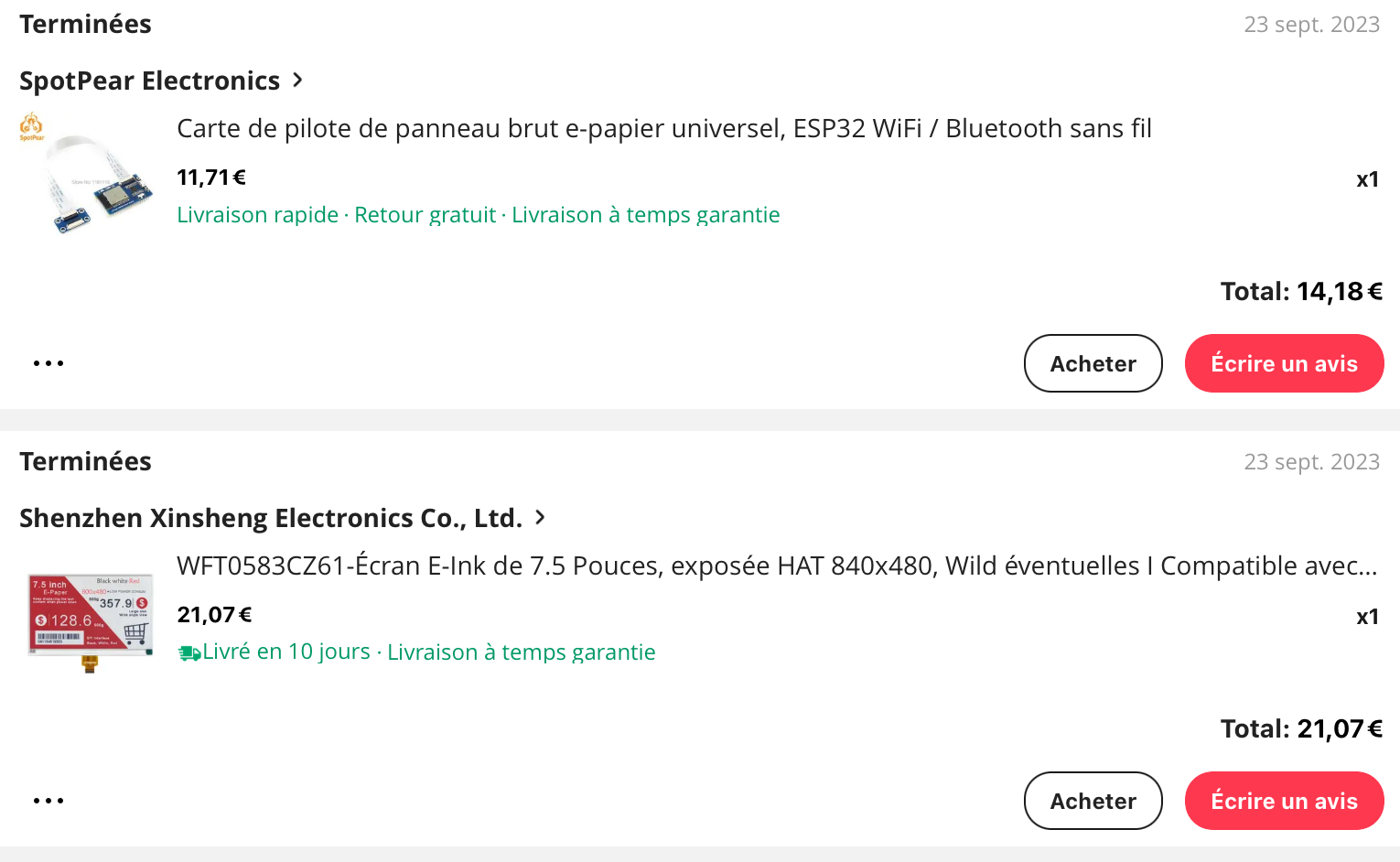
L’écran est indiqué en 840×480 chez Ali mais c’est bien 800×480.
Mes sources :
Github de Jean-Marc Zingg c’est la librairie GxEPD2 que j’utilise pour gérer l’affichage sur l’écran e-paper et je me suis inspiré des exemples qu’il propose (Merci à lui 🙂 )
Forum arduino qui traite de ce sujet attention + de 3 000 messages
Réalisation de xlyric (Cyril Poissonnier) une autre réalisation que j’ai utilisé (Merci à lui aussi 🙂 ) Il est très présent sur les forums autour du photovoltaïque et réalise un routeur pour optimiser l’auto-consommation.
Locoduino une référence les parties mqtt et OTA viennent d’ici.
Voir la version 2 sur le forum !